Radio with Wi-Fi…it sounds great to me!

Photo of the Evoke Flow Player
The Evoke Flow Player
I love Wi-Fi. When I heard that radios exist that can utilize Wi-Fi, I wanted to immediately get some…

According to a press release, the PURE EVOKE Flow: “…was the first truly connected portable radio. Made of the same polished and lacquered wood as a grand piano with a three-inch speaker, the EVOKE Flow delivers stunning sound quality. The optional ChargePAK battery makes this device eminently portable…”

After opening the box I found the radio enclosed in a soft, drawstring bag. That’s a great idea: the body of the radio is very shiny and reflective, and you’ll want to protect it from scratches.

There’s too much to tell about this radio, and too many features to comment on, so I won’t be able to cover everything.

On the top is a touch-sensitive “SnoozeHandle”. On the front are “Volume/Mute” and “Select/Pause” knobs. They are a little to small and slippery for my hands and fingers.

An antenna is on the back. Below it is a door for the optional rechargeable battery pack (ChargePAK E1, $49.95) which was not provided with the radio.

At the bottom is a mini USB port for the USB Ethernet Adapter for a wired network connection. Other ports at the rear include:
“Aux speaker”…
one for headphones…
“Stereo Out”…
“Aux In”…
and one for the supplied AC power supply.

The EVOKE Flow supports Digital Audio Broadcasting (DAB), which is not available in the United States.

It can receive FM broadcasts, and supports the Radio Broadcast Data System. RBDS is the service that allows for text information to be displayed about the station you are listening to, the song playing, etcetera. Ten FM radio stations can be preset.

The “PURE Lounge” is an internet portal accessible through a browser that enhances use of the EVOKE Flow. It can help with choosing and marking services to be access via the interface of the EVOKE Flow, as well as the PURE Sounds (which will be explained later). If I manually tune and listen to a “station” on the unit, the website will log the stations I have listened to. I use the website to find and preview stations, and then add some to “My Favourites”. (Or, you can just surf via the EVOKE Flow.)

An unlimited amount of internet streaming audio services can be selected as “favorites”.  The last time I checked there were:
16,092 “Stations” available…
1,399 “Listen Again Programmes” all from BBC radio stations that can be listened to on demand…
and 5,563 “Podcasts” that can be streamed.

The EVOKE Flow has a “Media Player” mode that allows for music to be accessed from a computer or network attached storage (NAS) device. More information about that can be found in the support section of their website.

There are 83 “PURE Sounds”, mainly intended to allow for an ambiance to be set:
“Babbling brook”
“Urban – City traffic and pedestrians”
“Dogs barking”
“Lake with lapping waves”
“Large ocean waves”
various bird sound options
“Rain, thunder, and lightning”
“Stormy evening”

Also available are “Pink noise” and “White noise”, “Acoustic guitar (E, A, D, G, B, E)” (for tuning), “Harley Davidson Shovelhead 1340 (1981)”, and “Snoring man”…which is very neat. I hope they expand their choices to more that are non-standard (like “Couple Arguing”, so people will consider staying away for fear of becoming involved in a situation).

The two alarms can be set to wake to DAB, FM, or a tone alarm. After a set number of minutes has elapsed, a sleep timer will switch the radio into standby (or off if powered by a ChargePAK). The kitchen timer will beep after countingd-down from a set time period.

The menus are not as easy to navigate as I desire. I suggest you keep the (6 x 3.5 inch) Quickstart Guide with the radio for reference purposes. I did notice that the more time I spend with the radio, the more a few things seem to become easier to access by manuvering around.

The EVOKE Flow can be upgraded via Wi-Fi (or USB). After the latest update, version 3.5, was downloaded and installed…the radio rebooted…and I needed to reconfigure my wifi settings.

To play audio in stereo:
use the heaphone out port…
the stereo (line out) port…
or the S-1 Flow Additional Speaker.

A remote control unit is available.

HD Hero 960 camera can be worn on head, and helmet

Photo of the HD Hero 960
The HD Hero 960 Product
Ever wish you had a camera you could wear on your helmet or head…or vehicle?

The HD Hero 960 uses a rechargeable battery. When it is fully charged, the camera should work for as long as 2.5 hours. It can be recharged using the included USB cable.

Pictures and videos are stored to SD and SDHC memory cards…cards up to 32 GB can be used. The average recording times are:
WVGA (60 fps): 8 hours, 9 minutes
720p (30 fps): 8 hours, 9 minutes
960p (30 fps): 5 hours, 26 minutes

The HD Hero 960 has a 5 megapixel camera that records video to H.264 compression, as MPEG4 (.mp4):
WVGA = 848×480 pixels (16:9), 60 fps, 8 Mbit/s data rate
720p = 1280×720 pixels (16:9), 30 fps, 8 Mbit/s data rate
960p = 1280×960 pixels (4:3), 30 fps, 12 Mbit/s data rate

Still photographs can be taken in single-shot, triple-shot, and self-timer modes. The camera can be set to take a shot in intervals of 2, 5, 10, 30, and 60 seconds until the battery is dead or the memory card is full.

Files on the memory card can also be accessed via the USB cable.
The housing is waterproof, and there are accessories to use with it:
a curved adhesive mount (for helmets)…
a helmet front mount (so the face of the person wearing the helmet can be seen)…
a flat adhesive mount…
a headlamp-style head strap…
and a quick-release buckle (that connects the camera housing to the mounts).

An HDTV can be connected to the HD Hero 960 via a component HDTV-out port. The audio-out port also disributes the composite video out. NTSC and PAL options are available for recording and playback.

To my surprise, the camera does not record a “flat” view as most cameras do…it has that “bowl” effect, like most videos I’ve seen from helmet cams on motorcross competitors. But, then again, that IS what this was designed for. The angle of view is 170º.

Blame it on my iPOD!

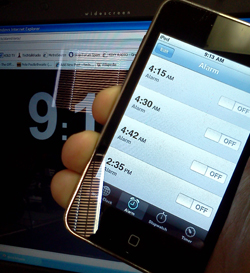
Photo of the iPOD Touch
Blame it on the iPOD!

Over the New Years Weekend, users of the iPhone “complained” of the devices not waking them or reminding them of events due to a bug in the Alarm Clock function of the device. I’m actually owner of an iPod Touch and found the same issues others had faced. Luckily after working Morning Radio for the past 20 years, you learn to rely very little on just one device, this is one of those cases a wind up clock or watch alarm can provide some of the best backup for those that need the alarm clock to wake up at a set time.

Apple has indicated that users can reset their devices alarms and they should be now working after the two day “blip” What is interesting now is how the Android users are so quick to pounce on the iOS users. It is almost though as if Apple users are catching a little of what has been dished out over the years from Mac at PC Users when issues cropped up with the PC.  T-Mobile has already started to poke fun at those often humorous Apple Ads, we’ll have to see if Google adopts the same ad campaign for its Android OS. 

Maybe the idea to tether to technology for even the most simple of functions still appeals to you. There are backups for getting the reminders you need. Sure, you could hire an out of work engineer to follow you around and remind you of events and appointments but that might be stretching it and could get rather expensive. Even though I would like to say, hey – how about a wind up clock – I know I would be failing in my desire to have you the reader or viewer at the top of your game in the tech world.

There are several websites that offer up Alarms, but remember – many of these are dependant on an Internet Connection which can fail – one of my favorites is http://www.alarmd.comYou can’t get more easy or basic then this and I have gone to bed with an hours sleep to have the Train Crossing Alarm to get me out of bed. If you don’t want to depend on an internet connections, you could check out some software for doing the same function http://www.aquariussoft.com/pc-alarm-clock/ Is one such program which can be purchased for under 30 bucks.

If you are running Windows 7 you can also Activate the gadgets feature and run the Alarm Clock with Windows but honestly, spending a few bucks on a Wind Up might be the best solution if you don’t want to come up with a Tech Excuse for bieng late for work!

For those running the Apple iOS in Version 4 can reset previous reminders and alarms and acording to apple should be working ok now.