Tax Procrastinators According to Intuit
Taxes can be an incredibly easy task to accomplish yet many of us put it off like a visit to the dentist. The Reasons can be assorted but we like to think that many that put off the filing till the date due just want to wait till the last possible minute to cut a check to the feds or it could be in fact to stem the flow of tears from the possibly diminished income from previous years.
Regardless, One of the companies to make it easy to file for both federal and state taxes and in some cases even file for free is the folks at Quicken. The have done some research and put together the Biggest Tax Procrastinators and surprisingly for the 5th straight year Houston is ranked the Biggest Procrastinator! In fact the state of Texas rules the list!
In the Study that Intuit put together they discovered that 27 percent of tax filers wait until the final two weeks before submitting thier tax documents. This year those filing are even granted an extra three days to file! April 18th 2011. Here is the list of those procratinators courtesy of Intuit,
1. Houston: Houston, we have a problem! Locals landed in the top spot in five of the last 10 years.
2. Chicago : Windy City residents are unable to move from No. 2 for the second year running, possibly due to food comas induced by all the deep dish pizza-eating.
3. New York : For the third year running in the No. 3 spot, New Yorkers in the City that Never Sleeps take a nap until tax time.
4. Austin : Busy Austinites, so burned out from festival-hopping, put off their tax duties – landing in the top five again.
5. San Antonio : It seems one of the biggest military centers in the U.S. needs more soldierly discipline this time around, popping into the top 10 for the first time since 2008.
6. San Francisco : Known as innovators for all things tech, San Franciscans are doing their taxes only a bit quicker, moving down one spot from No. 5 despite their connected reputations.
7. Seattle: It looks like all that rain is washing out more than mail routes for 7th place Washingtonians. Despite their commitment to java hot spots, filing taxes online before the tax deadline clearly isn’t a top priority.
8. San Diego : When you’re wearing sunglasses 24/7, it’s hard to even see your taxes, let alone file them. San Diegans file just a bit faster due to peer pressure this year with TurboTax headquarters right down the street.
9. Los Angeles : Starving actors hanging out in this town are too busy looking for some nosh. It’s no wonder they dread filing their taxes!
10. Dallas : They say cowboys ride alone, but Texans managed to lasso in four cities on this list — including No. 10, Dallas.
Dropping off the top 10 list this year: Las Vegas
The Wannabes
Extended List 11-20:
11. Las Vegas, Nev.
12. Washington, D.C.
13. Portland, Ore.
14. Atlanta, Ga.
15. Phoenix, Ariz.
16. Philadelphia, Pa.
17. Orlando, Fla.
18. Jacksonville, Fla.
19. Tampa, Fla.
20. San Jose, Calif.
The Makers of TurboTax reported that the the list was determined by the number of tax returns electronically filed via the TurboTax Online service between April 14 – 17, 2010. Thanks Intuit for the study, I was going to wait to read it but decided not to procrastinate!
Creative’s New Socialize HD AF Webcam Easy and Nice Looking!
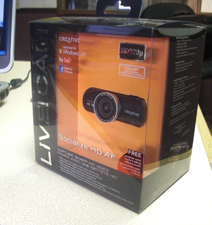
Yesterday Afternoon we received one of the latest Webcams from Creative, the Socialize HD AF. There are a ton of great features with this Webcam which go beyond the clear picture and small footprint of the webcam. We know that the average user for this webcam will be getting it to connect with friends and relatives across the country or in some cases, calling the user from the garage home studio to the dinner table (Sorry Gloria!).
I connected the Socialize HD AF to my laptop first to see how it would work with a minimal of settings. The Minimum system requirements for the camera call for an Intel Pentium Dual Core or AMD Equivalent at 1.6ghz with 1GB of RAM and Windows 7, Vista or XP SP2 or Higher but will also work on the Mac OS X 10.5 AND Linux Kernel 2.6!
The settings on the laptop were basic with 1Ghz AMD 3200, 2GB of RAM and we were able to install the camera without running the install CD. To benefit from integration with the Socialize HD AF, users will want to install the included software which allows for one touch recording or photo taking and installing to YouTube or Photo Bucket. I wasn’t a fan of the integration of the facebook uploads which were giving the Creative App a little too much freedom with my wall. The ability to take photos with the Live Central 3 Interface is non complicated to use and gives users the option to record video or snap a photo and even adjust the quality in which to do so. Even on the Laptop with the minimal requirements we were able to use the photo overlays to create some fun graphics as well as video avatars to enhance a fun creation. We only had a couple of them on the laptop that wouldn’t allow it. On our Production Behemoth in the office we were able to use all the features and the results of streaming video in 720p was impressive.
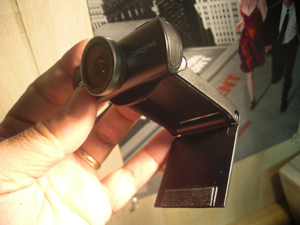
I was also impressed with the Wide Angle glass lens which captured more and provided a nicer picture then the previous webcam on our desk. Photos are capable to capture at 10MP which means users could blow them up to 8×10 rather easily. This is not native however and is handled through software enhancements. A Responsive auto focus feature can be used for those that do not want to manually adjust focusing. A 4x Digital zoom is also available with this camera which featured a lengthy USB 2.0 Cable. While more powerful, the camera features a smaller footprint then previous webcams and folds up nicely for transport with your mobile computer. A microphone on the camera picks up audio quite well and allows the user to speak at regular levels and still be heard. for those parents concerned with the kids accessing a web-cam, Parental Control with password protection is also available with this unit.
For those looking for 1080p HD Video, Creative has another camera on the market for this type of capturing, the InPerson 1080. The Suggested retail pricing for the Socialize HD AF is 69.99 on the Creative Website. For More Information take a look at http://www.mylivecam.com
Blame it on my iPOD!
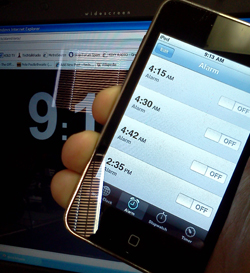
Over the New Years Weekend, users of the iPhone “complained” of the devices not waking them or reminding them of events due to a bug in the Alarm Clock function of the device. I’m actually owner of an iPod Touch and found the same issues others had faced. Luckily after working Morning Radio for the past 20 years, you learn to rely very little on just one device, this is one of those cases a wind up clock or watch alarm can provide some of the best backup for those that need the alarm clock to wake up at a set time.
Apple has indicated that users can reset their devices alarms and they should be now working after the two day “blip” What is interesting now is how the Android users are so quick to pounce on the iOS users. It is almost though as if Apple users are catching a little of what has been dished out over the years from Mac at PC Users when issues cropped up with the PC. T-Mobile has already started to poke fun at those often humorous Apple Ads, we’ll have to see if Google adopts the same ad campaign for its Android OS.
Maybe the idea to tether to technology for even the most simple of functions still appeals to you. There are backups for getting the reminders you need. Sure, you could hire an out of work engineer to follow you around and remind you of events and appointments but that might be stretching it and could get rather expensive. Even though I would like to say, hey – how about a wind up clock – I know I would be failing in my desire to have you the reader or viewer at the top of your game in the tech world.
There are several websites that offer up Alarms, but remember – many of these are dependant on an Internet Connection which can fail – one of my favorites is http://www.alarmd.comYou can’t get more easy or basic then this and I have gone to bed with an hours sleep to have the Train Crossing Alarm to get me out of bed. If you don’t want to depend on an internet connections, you could check out some software for doing the same function http://www.aquariussoft.com/pc-alarm-clock/ Is one such program which can be purchased for under 30 bucks.
If you are running Windows 7 you can also Activate the gadgets feature and run the Alarm Clock with Windows but honestly, spending a few bucks on a Wind Up might be the best solution if you don’t want to come up with a Tech Excuse for bieng late for work!
For those running the Apple iOS in Version 4 can reset previous reminders and alarms and acording to apple should be working ok now.
Adding a Hard Drive – “If All The Parameters Are In Place”
Adding a new Hard drive to the system should be easy and if all the parameters are in place, it will be. That’s the important thought however, “If all the parameters are in place…”
We received a Western Digital Caviar Green 3TB Internal Drive in to test out in the Media Center PC we are putting together and after putting the Motherboard and Processor in place, installing Memory, the Main Hard Drive (Western Digital 500GB 7200RPM 16MB Cache), Video Card and Windows 7 X64 (We’ll be testing with X32 as well) we were excited to add the WD Caviar Green 3TB Internal to the fold. After putting the rails on the drive and cables we booted the system up which located the drive. We selected the Create New Volume and after deciding to label the drive and choosing it as Drive M (For Media) we proceeded to Quick Format the Device. After about 30seconds the Quick Format failed and we then unchecked the box for Quick Format and decided it was possibly best to perform a detail and exact format. We knew this means it will take longer, but we were not expecting what happened next.
We started the format at 9:15am on Sunday 12/19/2010 and on Monday 12/20/2010 at 8:15am we were at 1%. Looking at the Storage Manager we could see that Windows 7 and the Intel Board could locate and visually see the drive however this was by no means normal. Without becoming all Sheldon on ya, this could in fact take 2 months, 23 days, 7 hours and 11.5 Minutes, give or take a month to format. Western Digital had sent a HPA Adaptor card which is a part of the 3TB Internal Drives, also the 2.5TB drives ship with this little card which plugs into the available PCI Express Port. We didn’t install the card since the Intel Board, the DH57DD was so new we assumed it should have no problem with the capacity of the drive.
If you aren’t aware, There are limitations in size for some boards accessing over 2.19TB. This little card that WD includes will help some boards be able to address the drive and welcome it to the hardware fold. WD even includes the plug in card with low riser and full size bracket for the smaller towers and regular sizes available. We plugged the card in, hooked up the drive and upon boot, the card was identified but the drive wasn’t. We let it boot and sure enough, nada was in the available drives. We shut it down, made sure the SATA Cable and power cable were connected firmly and rebooted. This time, the drive was seen and we proceeded to boot into Windows and begin the steps to reformat.
Once we deleted the previous volume and then reattempted in Quick Format Mode, it failed. We reattempted by deselecting the Quick Format and could see right away, the format was going to be a long process. Something just wasn’t right. We revisited the Western Digital website which features a very good video on adding a secondary drive with the WD Caviar Green 3TB and saw that all the steps we’d performed we’re inline. After a cup of coffee and racking the brain we decided to try one other step we hadn’t done, changing out the SATA Cable. We had provided this cable as the ones that came with the board were both used up.
Over the years you tend to amass a large quantity of cables and power cords, I always wonder if somewhere I forgot to hook up a cable because why do I have an extra!?
I located a SATA cable and connected it, rebooted the system went through the steps of deleting the old volume, recreating and performing a Quick Format. Viola! (Walla! for those not immersed in French..) Our Drive formatted and quickly. So, before you go calling Tech Support or heading back to Frys or Best Buy check the SATA cable to make sure that it isn’t the culprit. Also remember to toss the other cable since leaving it around will just cause you to put it in another system. Hopefully this helps somebody!!
Andy
You must be logged in to post a comment.