moving Windows to a different computer
We got a call from Gary who wanted to move an installation of Windows from one computer to another. It’s possible…BUT…here are some things you should know:
How to move a Windows installation to different hardware
You can restore a system state backup from one physical computer to the same physical computer or another computer that has the same make, model, and configuration (identical hardware).
Microsoft does not support restoring a system state backup from one computer to a second computer of a different make, model, or hardware configuration…Even if the source and destination computers appear to be identical makes and models, there may be driver, hardware, or firmware differences between the source and destination computers.
…the preferred method of recovery is to use the Automated System Recovery (ASR) feature. ASR automates the whole restore process. This process produces the most reliable result.
Hardware
If you remove any hardware on the destination computer that is not required to complete the restore process, you increase the probability of a successful restore operation. For example, physically remove or disable all but one network adapter. Install or enable the additional adapters after you restart the operating system after the restore operation.

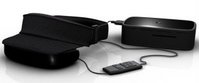 The Personal Cinema System has a range of potential uses. Content is fed to the headset via the small box you see pictured. Dubbed the Liberator, this box includes two USB ports, a Compact Flash slot and composite, component and S-Video inputs. Thanks to this wide range of connectivity, you could connect your PC (for games, Web browsing etc), video game console, video iPod, DVD players and anything else you can think of really.