Is that Site Down?

In this Weeks Show we discussed the recent issues with Facebook and Instagram with widespread reports of the services being down which affected 2.3 Billion Users! Of course this drove traffic to Twitter, even Facebook itself took to Twitter to let users know that the services were facing a downtime. It’s amazing how many people felt disconnected and shared the frustrations on Twitter and Snapchat with Meme’s and the pondering what the user may have down to infuriate the FB Gods to be ignored when trying to login!

It wasn’t you or your fault that sites were having an outage although I did tell my 78 year Great Aunt Delores it was her that took them down and to stay off the Internet! While we still haven’t heard the story of why the Sites were on Timeout other sites have taken a similar turn this week including Apple, Verizon, YouTube and Gmail and its services.

There are a few online tools available as we discussed on this weeks show which can give you a head up if a Service/Site is having an issue. Apple features a System Control Panel giving you a quick look at the different services and display the areas of trouble and accessible to the general public. Check it out at the Apple System Status page.

There are a couple of sites which can give you a pretty good overview of the many services online and when they may be having issues:

  1. Is It Down Right Now – Gives you current status on Netflix, YouTube, Gmail, Facebook, Steam and many other services https://www.isitdownrightnow.com/
  2. Down – Type in the URL and it will tell you if it’s down https://down.com/
  3. Down Detector – This Site is easy to use however requires you to click through to get your answer https://downdetector.com

These will give you a good overview of a Sites Status.
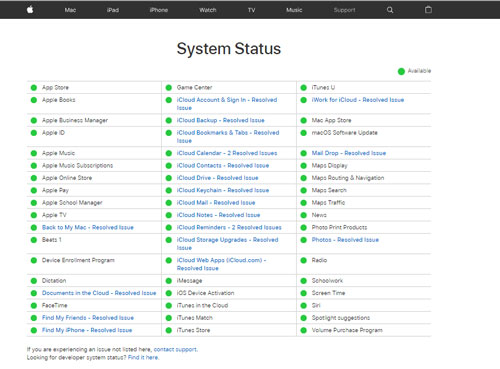
Screen Shot of the System Status Screen at Apple
System Status Screen on the Apple Website

November 7 show: new Apple TV, and StumbleUpon, explained…

We learn about the trials and tribulations that occurred when one of the guys attempted to purchase an Apple TV.

A review of the latest generation of Apple TV…is it worth the money?

The premiere/debut of “The 60-second TechBlast”.

ANDY explains why “arguing with a woman is like reading the software license agreement”.  (Again, ANDY said this…)

And our Website of the Week:  StumbleUpon


September 19 show…audio, notes, and links

The audio file of the show can be downloaded and streamed from here.

=====================

We talk to an Uber driver, and Justin explains how he uses Uber…without paying for it.

“…driving jobs for independent contractors in Tucson…work as much or as little as you want. Uber takes care of all the details…”

———————————–

Also, Uber is working with the UA College of Optical Sciences:

Brian McClendon, vice president of advanced technologies for Uber…”it’s clear that Arizona welcomes innovation.”

“…I look forward to working with Arizona…”

============================

iOS 9 has been released. Some got it (S!ick)…some didn’t (Andy)…and others don’t care (what’s-his-name/Justin).

————————————–

We learn that Apple uses end-to-end encryption in iMessage and FaceTime…

And in a related issue, Microsoft is resisting to comply with a warrant which orders it disclose contents of an email account…because the data is kept in a different country.

==================================

The cats of TechtalkRadio have new shirts for their “uniform”. And, so do cats.  (Again:  Justin’s fault.  Hey…I’m writing the post, I get to pick-on whom I choose to…)

================================

And here are some links related to subjects discussed during the show:

“…With Slingbox, you can watch live cable or satellite TV, video apps, recorded shows, and on demand shows on your phone, tablet, and computer. Anywhere in the world. Literally.”

Yahoo Livetext is live video texting, without sound…

“Tile is a tiny Bluetooth tracker and easy-to-use app that finds everyday items in seconds—like your phone, keys, and wallet.”

“Gazelle buys mostly Apple products, iPhones, iPads, iPods, Macbooks, Macs, select Apple TVs & Apple Displays. We also buy a select group of other smartphones and tablets like Samsung, Microsoft. LG and HTC to name a few…”

“Find your bacon lover. Introducing Sizzl – a real dating app for bacon lovers. Connect with thousands of like-minded lovers who share your selective taste in bacon…”


(i)Phones and security…

During our September 12 show, Justin mentioned an incident when an iPhone was hacked by a guy…I think this may be what he was referring to:

“Watch John McAfee hack a Fox News host’s phone live on air”


Relating to the issue of iPhone security, from an article in the New York Times:

…the Justice Department is engaged in a court dispute with another tech company, Microsoft…the company refused to comply…because the emails were stored on servers in Dublin.

…two types of encoding…end-to-end encryption, which Apple uses in its iMessage system and FaceTime, the video conversation system…

With Apple, the encryption and decryption is done by the phones at either end of the conversation; Apple does not keep copies of the message unless one of the users loads it into iCloud, where it is not encrypted…

The second type of encoding involves sophisticated encryption software on Apple and Android phones, which makes it all but impossible for anyone except the user of the phone to open stored content — pictures, contacts, saved text messages and more — without an access code…


Free PDF editor for Mac OS

It was great to receive the following announcement, and be able to share it with you, with weeks to go before the deadline…


We are pleased to announce a limited-time giveaway of PDF Editor Mac Pro 3.0, a powerful and now free PDF application for Mac OS X…

The basic application is always free…After the promotional date, the application will return to its original price of $39.95 (USD). Once users activate the product, it will be full lifetime license and doesn’t have a limited time.

The Pro version will not add a default watermark to all saved PDF files. Instead, it gives users the option to add their own watermark or opt out of using a watermark all together. PDF Editor Mac Pro also provides owners of the application with 24×7 email support, free and worldwide.

Feature Highlights:

* No default watermark added to saved PDF
* Simple and intuitive User Interface
* Add and edit text and images
* Supports JPG, PNG, GIF, BMP, TIFF, and more
* Delete content
* Ability to rotate orientation of PDF
* Ability to draw vertical and horizontal lines
* Custom watermark all pages
* Undo/Redo options
* Zoom in/Zoom out options
* Commercial use allowed for additional cost
* Around the clock email support, free and worldwide
* Tutorial

Giveaway Page:
http://www.pdfeditormac.com/giveaway.html

The offer is good until April 20…