Episode 471 – AI Ads, New Tech & The Death of Trust Online | TechtalkRadio

This week on TechtalkRadio, Andy Taylor, Justin Lemme, and Shawn DeWeerd are finally all back in the same episode—and they waste no time diving into the biggest tech vibes of the week: Super Bowl ads, AI overload, and the growing feeling that nothing we see online can be trusted at face value.


The crew kicks things off talking about how Super Bowl commercials just don’t hit like they used to—especially now that so many ads get spoiled early and a wave of “AI everything” messaging has officially arrived. One standout: the uneasy reaction to a Ring-style “AI neighborhood search” concept that left everyone asking the same question… is this helpful… or is this Big Brother? That leads into a bigger conversation about terms-of-service “gotchas,” features enabled by default, and how the U.S. and EU often treat consumer protections very differently. Andy found his old Dude Your Getting a Dell T-Shirt, The Guys wondered what happened to the Dude Guy? 10 years ago this week – He answered the Questions in this video for TechInsider posted to YouTube

From there, the episode shifts into something closer to home: the ongoing Nancy Guthrie case in Tucson and how AI-generated “enhancements” and misinformation are muddying the waters online. The guys discuss how quickly fake visuals and wild speculation can spread, especially when streamers and social feeds turn a real investigation into 24/7 content. The takeaway is simple—and kind of scary: AI is making it harder than ever to trust what we’re seeing.

Listener questions bring the episode into practical territory. One parent asks where teens should start with AI, and the answer is all about guardrails: keep it open, keep it honest, and stay involved. Justin shares a great real-world example—using AI as a supervised helper so his son can learn Roblox Studio and build an actual working game. (Proof that with the right oversight, these tools can be more “creative superpower” than “digital doomscroll.”)

Then it’s nostalgia time. Susan in Green Valley wants to revisit classic Windows 95-era games, and Shawn points listeners toward GOG (Good Old Games) for DRM-free classics and the Internet Archive for browser-playable retro titles. The gaming talk escalates into Diablo vs. World of Warcraft, “Will It Run Doom?” madness (yes, people run Doom on everything), and even a moment of remembrance for Hideki Sato, a key figure behind Sega’s legendary hardware era—including the Dreamcast.

The episode wraps with a quick Apple-watch segment: a teased “special Apple experience,” rumors of new hardware like an iPhone 17E and MacBook Pro with M5, and a side-road into shifting tech ecosystems—Windows frustrations, growing Linux momentum, and Andy’s ongoing real-world adjustment to Android life with his Pixel. As always: listener questions, tech laughs, and just enough chaos to keep it fun.
Episode 470 – Security Cams, Skydiving Birthdays & “Remember When USB 3.1 Was New?”

TechtalkRadio kicks off Valentine’s weekend 2026 with a practical update on home security cameras—and why this topic is suddenly front-of-mind for a lot of people. Andy explains how cloud-based doorbells can still capture (and upload) footage even without an active paid plan, what “short-window” history looks like on some systems, and why notifications (including email alerts) can matter when you’re trying to piece together a timeline.

From there, Andy compares camera approaches: cloud-first doorbells like Google Nest, local-recording options that use microSD loop recording, and higher-resolution setups like Reolink (including solar-powered placements for property coverage). He also hits real-life usability stuff that’s easy to overlook—glare behind glass when placing a camera indoors towards the exterior. This is possible with the Girafit Indoor, also how quickly you can save clips to your phone, and why you might not want to disable motion/vehicle notifications even if they’re annoying.

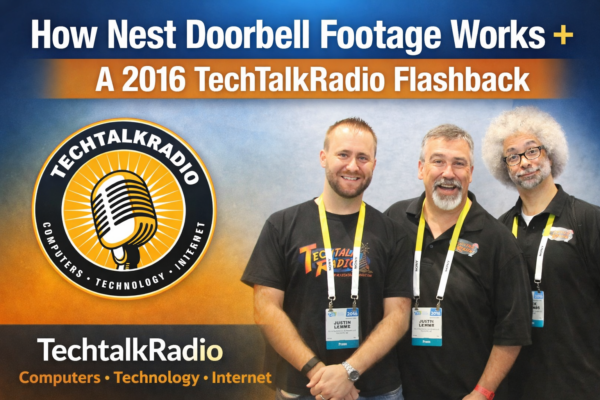
Then the show jumps into a 2016 flashback recorded this same week: a super-relatable PC upgrade spiral (new CPU means new motherboard, which means new RAM, which means… everything). The crew debates overclocking, thermals, motherboard quality, and warranty choices—plus Justin drops the always-handy PCPartPicker tip for anyone building on a budget.

Part two of the flashback brings back “60 Second Tech,” including iPhone LED flash alerts for notifications, smarter shopping comparisons when buying laptops, and early predictions about autonomous delivery and driverless regulation.

Back to current day, Andy closes the episode with a quick nod to Black Mirror (and how fast reality keeps chasing sci-fi), plus a couple of websites worth checking out.

Got a question for the show? Email techguys@techtalkradio.com, and catch more at techtalkradio.com.

Please Share, Listen, Subscribe to the Show on Spotify, Spreaker, iHeartRadio, YouTubeConnect With Us on social media –

Also Available on KGVY AM/FM, Amazon Music, GoodPods, PodBean and other Delivery Networks!

Episode 458 – “The Cloud Crashed: When the Net Goes Dark.”

Subscribe

For this week on TechtalkRadio, Andy Taylor and Shawn DeWeerd tackle the story that shook the web — the massive AWS outage that left millions wondering if their internet had vanished. The pair break down what really happened when Amazon’s U.S. East-1 region went down and how a simple DNS failure can ripple through nearly every service we use. From Coinbase and Reddit to Roku, Robinhood, and even smart-home devices, the hosts explain how so much of our digital life runs through the same narrow pipes — and why that can be a dangerous single point of failure.

With streaming services sputtering and smart devices silent, Andy and Shawn turn their attention to the unexpected hero of the week: physical media. They discuss why DVDs and Blu-rays are making a quiet comeback and share the tools that make it easy to preserve your collection — from MakeMKV for ripping discs to HandBrake for compressing files and Plex for organizing your own personal streaming library. It’s a reminder that having your favorite shows and movies on hand (and not in the cloud) can be both nostalgic and smart in 2025.

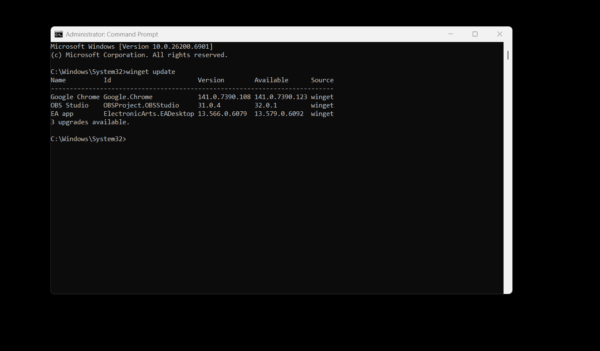
The episode also dives into practical Windows tips, including Microsoft’s WinGet — a built-in command-line updater that keeps your apps current with a single command. Shawn tests it live on air and finds nearly half of his software out of date. Andy also fields listener questions about Windows 11 S Mode, breaking down who it’s for, why most users eventually turn it off, and how Microsoft’s locked-down environment compares to the open flexibility we’re used to.

Finally, the hosts spotlight two incredible websites that make technology feel fun again. TV.garden lets you spin a virtual globe and watch free, live television from countries all around the world — a discovery that had Shawn geeking out over obscure motorsport streams. And Explore.org offers a front-row seat to nature through hundreds of live animal cams, from Alaska’s famous Fat Bears to serene ocean sanctuaries. Whether the cloud is crashing or calm, Andy and Shawn remind us that tech should connect, entertain, and inspire — even when the net goes dark.

Episode 428 – Grok It Like It’s Hot: A Look at AI, Games & TV Tricks!

On this week’s TechtalkRadio Broadcast, Justin, Shawn and Andy talked about how they manage workloads and prioritize projects when dealing with IT Issues. Justin shared that he structures tasks around his budget and board approval, often using AI tools like Grok to help craft presentations, job descriptions, and marketing materials to help explain to the less Tech Saavy for an understanding of needs for the IT Team . While Andy wondered if Grok compares to ChatGPT with Justin noting Grok’s ability to pull real-time data and provide comprehensive information on demand of a more current nature.

In a live demonstration, Justin used Grok to search for Andy and Shawn, uncovering detailed professional and personal data from public sources and social media—sparking a discussion on privacy and how much of our lives are available online. This led to a broader chat about the pros and cons of such tools, with Andy and Shawn expressing concerns over data accuracy and the implications for personal security. The Crew sends out Congratulations to Co-Host Amanda, She has been named one of the Top 30 K-12 IT Influencers to follow in 2025 from EdTech. Read more on the EdTech Magazine Website

The trio also explored online safety, with Andy highlighting risks on platforms like Snapchat and stressing the importance of turning off location services. Justin shared a story from the game Sea of Thieves, where a young player casually revealed personal info, underlining how easily privacy can be compromised—even in gaming environments. They also touched on social engineering and the need for greater caution online.

Wrapping up, the group tackled a listener question from Dave about recording over-the-air TV using devices like the HD Home Run, discussed Comcast mobile savings, and talked about using Moca to expand home networks over existing Coaxial connections. They finished with some fun—chatting about the Minecraft Movie and the Chicken Thing, mini battle bots and more. 

Episode 435 – There is a Simulation for Everything!

In this Weeks TechtalkRadio Show, Andy, Shawn, and Justin discussed their previous recording session, which was postponed due to various reasons. They also talked about their personal lives, including Shawn’s sleep schedule and falling aslep while the show was waiting for him! Justin talks about doing Voiceover work and Andy mentions a great Video on YouTube titled “5 Guys in a Limo” that showcases the best voiceover actors of their time.

Justin tells us a about his decision to buy his son Eric a gaming laptop, the Acer Predator, which has a 4,060 RTX and 16GB RAM. Justin also installed parental control software called Qustodio to monitor Eric’s online activities. However, Eric was more interested in watching YouTube videos on the new laptop than playing games. The guys share some possible games and while Doom and Wolfenstein are mentioned one that Andy wants to try is Power House Washing, a Simulation. Justin also mentioned a YouTube channel called Let’s Game It Out, which they both enjoy watching.

Andy discussed a couplle of products he recently took a look at: the Asus Rog Flow Z13, a gaming laptop/tablet with AMD 395, and the Epson RR600W, a rapid receipt scanner. Andy shared his positive experience with the Asus product, highlighting its performance and features. He also demonstrated the Epson scanner on live TV but encountered issues due to Andy forgetting to plug a cord in! The Epson scanner can scan up to 100 receipts per minute, front and back, and can also scan photos at 600 dpi.

In a segment recorded earlier, Andy welcomes Author Titania Jordan to the show to discuss the challenges of internet safety for children. Titania, the CMO and Chief Parent Officer at Bark Technologies, shared her experiences as a parent and her insights from her book “Parenting in a Tech World”. She emphasized the importance of staying updated with the latest information on internet safety, as the situation has evolved significantly since her first book was published in 2020.  Andy and Titania discussed the challenges of parenting in the digital age, particularly with regards to children’s use of smartphones and social media. Titania emphasized the importance of being proactive and not waiting until a crisis arises. They also discussed the need for parents to be aware of the constantly evolving language and emojis used by teenagers, and the potential dangers of allowing strangers to communicate with children through apps and games. Titania recommended using safer alternatives such as the Bark app or Bark phone for children’s devices, and advised parents to delay giving their children access to all devices and apps until they are ready. Her latest title is available at Amazon. 

Justin, Andy, and Shawn regroup and share the Website of the Week, Lazyfly dot me, which is a challenging game very basic in graphics but fun. 

Tune in for all this and more on TechtalkRadio!

Connect With Us on social media
YouTube @TechtalkRadio
Facebook @techtalkers
Instagram techtalkradio
Web: TechtalkRadio.Com

Available on Audacy, iHeart, Apple Podcast, Amazon Music, Google, Spotify and Spreaker!