Every other week Andy Taylor of TechtalkRadio visits KMSB Fox 11 to share the latest in Tech and Gadgets for the Consumer and Small Business. In one of our recent segments, Andy talked with Mark Stine about a drive from the Arizona Technology Council to recycle used electronics.
Everything from Big Screen Televisions to Old Computer Towers were recycled in this drive and while the push was on for a set period of time, the effort continues. Check with your local Electronics and Computer dealers on how they can help recycle your older systems.
Locally in the Tucson Area, SWS Electronics and Computers will work with you and recycle your older computers and the Arizona Technology Council may be able to provide an expanded list.
We also shared a very cool product from Apogee Digital for the Desktop which is for recording directly into your iPad, iPhone or Mac. Field Reporting just got a whole bit easier!
Cables, Cables, Cables!! It seems that we can never get rid of our cables. They probably wouldn’t be that much of an issue if they didn’t always seem to fall behind the desk or turn into a mountain of spaghetti. Cable organizing devices have come along that usually place the cables out of site and still require some fumbling to find them when needed. That’s where Andrew Adams and Greg Peterson put their concept to work on Kickstarter.
The MOS or Magnetic Organization System helps eliminate cable and cord clutter with its base made up of a stylish anodized aluminum that can be wall mounted or set on the top of a desk to easily access the cord needed. Two other options in the MOS look is a white plastic or black plastic base. A fine example of the use of the MOS is the plug in of a cell phone device to transfer files to the computer. No having to fumble through a desk or finding the right cable, this MOS device easily helps eliminate the frustrations of cable mess!
Priced at around 25 bucks the MOS also ships with 3 color coordinated ties which can be used on the cables without a great deal of metal in the base. The MOS is one of those devices that will sit on the desk, you may not think about it much once it’s in use however you will likely appreciate what it “brings to the table!” My only concern is to remind this is a magnetic device. While it can sit on your desk, preferably not under your monitor, you will want to keep your cell phones and other electronics clear of this. It certainly looks good on the desktop and more projects are funding through Kickstarter to bring these items from Andrew and Greg to manufacturing.
A quick trip to the Soluto “Anti-Frustration Software” site, an 80 second video, a small download and an easy install, netted this user over a 25% savings on start up times to an already speedy system!
The entire process is quite intuitive and user friendly, offering both beginner and advanced options to guide you step-by-step. With the end results listing all the programs that run at start up and exactly how long it actually takes.
As you can see above, my system took a little over two minutes to load, with 80 applications running AT BOOT UP (I had no idea).
The green section shows “No-brainer” applications to remove from the boot up list…to be delayed or paused to be more precise, and hovering over any of the slices reveals a drop drown information window that tells you how long that program is taking to load up, the name of the program and a recommendation to either pause or delay that program on future start ups.
After spending a couple of minutes deciding to either delay a program or pause it all together, I restarted my computer shaved off nearly 30 seconds from previous start ups.
Soluto‘s goal is “ to bring an end to the frustrations PC users encounter”; however, there are so many different programs, with so many different people – who have various levels of skill – being used in so many different configurations, that the task itself seems overwhelming…Enter: The PC Genome project.
“Soluto’s PC Genome is a knowledgebase of PC frustration data built automatically through the usage of Soluto software. Its objective and statistical information, gathered and analyzed by Soluto, is also editable by the community.”
Included in this beta version is even an option to let Soluto know when you’ve been the victim of some computer operation or lack there of. You simply right click on the Soluto icon in the systray, and click on “My PC just frustrated me” and the program sends a report back to the PC Genome project, with ‘Frustration Suspects’ that will be analyzed and ‘mapped’ in order to provide a future solution.
Who knows, maybe one day soon, we will live an a frustration free world…but until then, there’s always Call of Duty or Whack-a-mole for a therapeutic outlet. ~ DDTG
The Evoke Flow PlayerI love Wi-Fi. When I heard that radios exist that can utilize Wi-Fi, I wanted to immediately get some…
According to a press release, the PURE EVOKE Flow: “…was the first truly connected portable radio. Made of the same polished and lacquered wood as a grand piano with a three-inch speaker, the EVOKE Flow delivers stunning sound quality. The optional ChargePAK battery makes this device eminently portable…”
After opening the box I found the radio enclosed in a soft, drawstring bag. That’s a great idea: the body of the radio is very shiny and reflective, and you’ll want to protect it from scratches.
There’s too much to tell about this radio, and too many features to comment on, so I won’t be able to cover everything.
On the top is a touch-sensitive “SnoozeHandle”. On the front are “Volume/Mute” and “Select/Pause” knobs. They are a little to small and slippery for my hands and fingers.
An antenna is on the back. Below it is a door for the optional rechargeable battery pack (ChargePAK E1, $49.95) which was not provided with the radio.
It can receive FM broadcasts, and supports the Radio Broadcast Data System. RBDS is the service that allows for text information to be displayed about the station you are listening to, the song playing, etcetera. Ten FM radio stations can be preset.
The “PURE Lounge” is an internet portal accessible through a browser that enhances use of the EVOKE Flow. It can help with choosing and marking services to be access via the interface of the EVOKE Flow, as well as the PURE Sounds (which will be explained later). If I manually tune and listen to a “station” on the unit, the website will log the stations I have listened to. I use the website to find and preview stations, and then add some to “My Favourites”. (Or, you can just surf via the EVOKE Flow.)
An unlimited amount of internet streaming audio services can be selected as “favorites”. The last time I checked there were:
16,092 “Stations” available…
1,399 “Listen Again Programmes” all from BBC radio stations that can be listened to on demand…
and 5,563 “Podcasts” that can be streamed.
The EVOKE Flow has a “Media Player” mode that allows for music to be accessed from a computer or network attached storage (NAS) device. More information about that can be found in the support section of their website.
There are 83 “PURE Sounds”, mainly intended to allow for an ambiance to be set:
“Babbling brook”
“Urban – City traffic and pedestrians”
“Dogs barking”
“Lake with lapping waves”
“Large ocean waves”
various bird sound options
“Rain, thunder, and lightning”
“Stormy evening”
Also available are “Pink noise” and “White noise”, “Acoustic guitar (E, A, D, G, B, E)” (for tuning), “Harley Davidson Shovelhead 1340 (1981)”, and “Snoring man”…which is very neat. I hope they expand their choices to more that are non-standard (like “Couple Arguing”, so people will consider staying away for fear of becoming involved in a situation).
The two alarms can be set to wake to DAB, FM, or a tone alarm. After a set number of minutes has elapsed, a sleep timer will switch the radio into standby (or off if powered by a ChargePAK). The kitchen timer will beep after countingd-down from a set time period.
The menus are not as easy to navigate as I desire. I suggest you keep the (6 x 3.5 inch) Quickstart Guide with the radio for reference purposes. I did notice that the more time I spend with the radio, the more a few things seem to become easier to access by manuvering around.
The EVOKE Flow can be upgraded via Wi-Fi (or USB). After the latest update, version 3.5, was downloaded and installed…the radio rebooted…and I needed to reconfigure my wifi settings.
To play audio in stereo:
use the heaphone out port…
the stereo (line out) port…
or the S-1 Flow Additional Speaker.
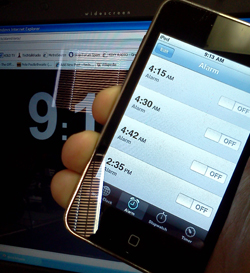
Over the New Years Weekend, users of the iPhone “complained” of the devices not waking them or reminding them of events due to a bug in the Alarm Clock function of the device. I’m actually owner of an iPod Touch and found the same issues others had faced. Luckily after working Morning Radio for the past 20 years, you learn to rely very little on just one device, this is one of those cases a wind up clock or watch alarm can provide some of the best backup for those that need the alarm clock to wake up at a set time.
Apple has indicated that users can reset their devices alarms and they should be now working after the two day “blip” What is interesting now is how the Android users are so quick to pounce on the iOS users. It is almost though as if Apple users are catching a little of what has been dished out over the years from Mac at PC Users when issues cropped up with the PC. T-Mobile has already started to poke fun at those often humorous Apple Ads, we’ll have to see if Google adopts the same ad campaign for its Android OS.
Maybe the idea to tether to technology for even the most simple of functions still appeals to you. There are backups for getting the reminders you need. Sure, you could hire an out of work engineer to follow you around and remind you of events and appointments but that might be stretching it and could get rather expensive. Even though I would like to say, hey – how about a wind up clock – I know I would be failing in my desire to have you the reader or viewer at the top of your game in the tech world.
There are several websites that offer up Alarms, but remember – many of these are dependant on an Internet Connection which can fail – one of my favorites is http://www.alarmd.comYou can’t get more easy or basic then this and I have gone to bed with an hours sleep to have the Train Crossing Alarm to get me out of bed. If you don’t want to depend on an internet connections, you could check out some software for doing the same function http://www.aquariussoft.com/pc-alarm-clock/ Is one such program which can be purchased for under 30 bucks.
If you are running Windows 7 you can also Activate the gadgets feature and run the Alarm Clock with Windows but honestly, spending a few bucks on a Wind Up might be the best solution if you don’t want to come up with a Tech Excuse for bieng late for work!
For those running the Apple iOS in Version 4 can reset previous reminders and alarms and acording to apple should be working ok now.


You must be logged in to post a comment.