Episode 487 – Fake Ads, Instant Photos and Dust Bunnies

This week on TechtalkRadio, Andy Taylor, Shawn DeWeerd and Justin Lemme get together for a wide-ranging conversation that begins with Shawn’s continuing cleanup after a basement flood—and quickly turns into a discussion after Andy notes that some Home Repair Companies are using A.I. to create recreations of home disasters focusing on how artificial intelligence is changing the media we see and hear every day.


Andy brings up the growing number of AI-generated television commercials, including ads where the visuals—and possibly even the music—have that unmistakable AI feel. Shawn talks about his experience creating parody music with Suno and how, after spending hours working with the platform, he has begun recognizing certain rhythms, vocal inflections and other characteristics of AI-generated music. The discussion raises a bigger question: as AI-generated images, music and video become more convincing, will we constantly wonder whether what we’re seeing and hearing was actually created by a person?

Andy also shares a positive use for generative AI: using Suno to turn lyrics written for a man’s 70th birthday into a personalized song for a video presentation. It’s an example of where AI can become a genuinely useful creative tool rather than simply replacing traditional content creation.

Justin demonstrates just how quickly generative AI works by creating a ridiculous AI advertisement during the show. The conversation then moves into Grok inside Tesla, with Justin explaining how he can talk to the AI from his car, ask questions and even use it to help with navigation. That leads the guys into comparing the strengths of Grok, ChatGPT, Gemini, Claude and Microsoft Copilot—and how different AI platforms may be better suited for different jobs.

Photography gets plenty of attention, too. Andy talks about using Photoshop, Lightroom and AI tools such as Gemini to restore old family photographs, and the guys discuss why vintage Polaroids can be especially difficult to clean up without changing the character of the original image. Shawn makes the case for leaving many Polaroids alone—the imperfections, light leaks and unusual colors are part of what makes instant photography special.

That conversation leads naturally into the new Pokémon and Polaroid collaboration, including special-edition Polaroid Go cameras, Pokémon-themed designs and collectible film frames. The crew also talks about how something that was once considered inexpensive instant photography has become a much more costly hobby.

Later, the discussion turns practical when a listener asks about improving a home network. Justin explains the advantages of mesh Wi-Fi, discusses options including Orbi and TP-Link, and raises concerns about how some big-tech-connected networking products may handle user data. The conversation expands into online privacy, targeted advertising and the desire some users have to reduce their dependence on companies such as Google, Amazon and Meta.

The guys also dig into Wi-Fi 7, explaining an important point that’s easy to overlook: buying a Wi-Fi 7 router doesn’t automatically make everything faster. To take advantage of multi-gigabit Internet service, switches, network adapters, computers and other hardware throughout the network also need to support those faster speeds.

Justin brings some humor to emergency preparedness with the story of testing a small hand-crank/solar NOAA weather radio with his son just as a real flash-flood warning sounded. The frightening alert tones weren’t a malfunction—they’re deliberately designed to grab attention and activate Emergency Alert System equipment.

The show also ventures into radio communications as Shawn discusses GMRS and FRS radios, repeaters and the FCC’s concerns about large networks of linked GMRS repeaters. Shawn explains how linking repeaters across large areas can tie up frequencies shared with ordinary FRS walkie-talkies, creating interference and regulatory concerns.
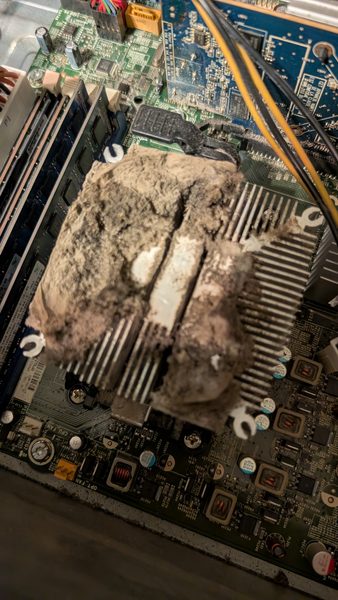
The guys also share some tips about the importance of keeping your computers free of dirt and dust and share a couple or ways to do that.
News13 Segment –  Bringing those Digital Files Back to Life!

For this Weeks News13 Segment on KMSB Fox 11, We focus on Recovering Files after they have been deleted. It can happen through Accidental Deletion or after a drive failure, finding files on other no longer used drives, even if they have been reformated! We have used other programs in the past and found the layout for EaseUS to be a great solution for all levels of Tech Knowledge.

We Featured the EaseUS Data Recovery Program to help find files that were deleted or Lost. After a Recent Hard Drive Failure, we have had to restore files, some deleted and found the Program from EaseUS – Data Recovery Software to be a great solution, and the company offers a Free Version for those with easy small file recovery needs, Find them at https://www.easeus.com

New Show Posted! Episode 312 – Shawn’s New Earbuds!

In this week’s show, Justin, Shawn, and Andy talk about the recent trip Justin had to make to Dallas for Work and what it’s like flying during the Pandemic. Justin shares some of the changes and the guys talk about flying first class and how it used to be.

Microsoft Windows 11 has been given a date for release of October 5th to roll out the free upgrade from Windows 10. Microsoft also acknowledges the OS will run on older systems if installed from an ISO. Shawn runs down the highlights of Windows 11. Shawn talks about a Vertical task bar is eliminated in the new Windows 11. More people are holding on to their computer systems longer, however for those wanting to upgrade, the guys talk about doing it yourself and how it can be overwhelming and offer some tips to make it easier. Andy tells us about the Upcoming release of Free Guy to Streaming and BluRay

Andy talks about walking the aisles of Best Buy and getting photos of products that should be featured on the show. Shawn tells us about getting his Wyze Ear Buds and give us his thoughts, the Pros and Cons of them including range, comfort, battery, and cost. Justin shares a story on how the Chinese government is planning to regulate gaming for minors during the weekday. The guys talk about how they are going to be implementing this. The guys talk about backing up your PC and while Andy loves Acronis, Shawn shares a Cloud Service his Mom has been using called BackBlaze.com

New Show Posted Episode 302

EPISODE 302: Wading in the Water and Not Getting Wet

In this Weeks TechtalkRadio Show, its Andy Taylor and Justin Lemme on the show. Shawn is on the Road for a Getaway and the guys talk about doing road trips and the Technology that goes with it. Andy ask Justin if he uses the Apps for Trip Planning or Gas Cost when RoadTripping. The guys talk about the Ransomware attack on Colonial Pipeline and what measures companies are taking in protecting their data. Justin and Andy talk about Phishing done to get information and why caution should be used in Social Media Questionnaires.

Justin has been trying out the Oculus Quest 2 and loves it. He tells us some of the fun experiences he has with it. One that he really likes is RealVR Fishing, super basic but a fun relaxing experience. Wear Glasses? Justin talks about how that works with the Oculus Quest 2.

Andy Taylor talks with Doug Little from Wacom about the recent introduction of the One by Wacom and how it fits so well into Education. Justin gives us the Website of the Week, https://www.ghin.com for Golfers that want to keep an eye on the Golf Handicap.

Facebook @techtalkers
Twitter @TechtalkRadio
Instagram techtalkradio
Web: TechtalkRadio.Com
Subscribe and Like on Spreaker!

KMSB Fox 11 Segment Backing Up Your Data!

For this Mornings Segment we took a look at the Important process of Data Backup. Wednesday March 31st was World Backup Day. The idea was to do it before April 1st, Don’t Be a Fool, Backup! Even if you missed out on World Backup Day, it is always wise to, and I Quote Larry the Cable Guy “Get er done!”

For the Segment we stress what is a backup, A backup is a second or to be real safe a third copy of all your important files — for example, your family photos, home videos, documents and emails so you would never lose them in the event of a Disaster.

Instead of storing it all in one place (like your computer), you keep another copy of everything somewhere safe. First of All, while copying them to a Flash Drive or External Hard Drive, there are options to restore your system in the case of a hard drive failure, and it happens. The technology behind the storage devices has become much better over the years moving from a traditional “Spinny” drive to SSD Drives (Solid State – No Moving Parts)

While I am a fan of the Acronis Software, True Image 2021 and not only giving you a way to make an Image Copy of your system but also backups when your system changes. The newest version also offers data protection with Cloud Backups – storing your data in a secured cloud setting.  The Product sells for about 40 dollars for a single version and for a Five User System about $70. There is a few free options and one that gets a lot of love is EaseUS.Com. The Free Software will do backups and incremental backups. The Pro Version which is $30 can do drive imaging

Hardware for backup can be done with various Hard Drives and they come in different sizes. If you have a 500GB drive in your system, I recommend 750GB or Larger, the cost per terabyte is very reasonable. One option is the  My Passport drive from WD –portable hard drive storage for your Windows computer (can be reformatted to support other operating systems). Available in up to 5TB of storage, the My Passport drive also offers automatic backup software

Also don’t forget to backup your Smartphones – whether you use google drive or icloud depending on your device – SanDisk makes a removable flash drive that can connect to your device and using software easily backup your photos, videos and documents.

Portable is important because, you really don’t want to store your backup with your system, a fire or disaster would effect your backups – having it at work or in a safe deposit can protect your data from this. I recommend taking a look at the hardware at wd.com and for more on the need to back up your data – http://www.worldbackupday.com/