Radio with Wi-Fi…it sounds great to me!

Photo of the Evoke Flow Player
The Evoke Flow Player
I love Wi-Fi. When I heard that radios exist that can utilize Wi-Fi, I wanted to immediately get some…

According to a press release, the PURE EVOKE Flow: “…was the first truly connected portable radio. Made of the same polished and lacquered wood as a grand piano with a three-inch speaker, the EVOKE Flow delivers stunning sound quality. The optional ChargePAK battery makes this device eminently portable…”

After opening the box I found the radio enclosed in a soft, drawstring bag. That’s a great idea: the body of the radio is very shiny and reflective, and you’ll want to protect it from scratches.

There’s too much to tell about this radio, and too many features to comment on, so I won’t be able to cover everything.

On the top is a touch-sensitive “SnoozeHandle”. On the front are “Volume/Mute” and “Select/Pause” knobs. They are a little to small and slippery for my hands and fingers.

An antenna is on the back. Below it is a door for the optional rechargeable battery pack (ChargePAK E1, $49.95) which was not provided with the radio.

At the bottom is a mini USB port for the USB Ethernet Adapter for a wired network connection. Other ports at the rear include:
“Aux speaker”…
one for headphones…
“Stereo Out”…
“Aux In”…
and one for the supplied AC power supply.

The EVOKE Flow supports Digital Audio Broadcasting (DAB), which is not available in the United States.

It can receive FM broadcasts, and supports the Radio Broadcast Data System. RBDS is the service that allows for text information to be displayed about the station you are listening to, the song playing, etcetera. Ten FM radio stations can be preset.

The “PURE Lounge” is an internet portal accessible through a browser that enhances use of the EVOKE Flow. It can help with choosing and marking services to be access via the interface of the EVOKE Flow, as well as the PURE Sounds (which will be explained later). If I manually tune and listen to a “station” on the unit, the website will log the stations I have listened to. I use the website to find and preview stations, and then add some to “My Favourites”. (Or, you can just surf via the EVOKE Flow.)

An unlimited amount of internet streaming audio services can be selected as “favorites”.  The last time I checked there were:
16,092 “Stations” available…
1,399 “Listen Again Programmes” all from BBC radio stations that can be listened to on demand…
and 5,563 “Podcasts” that can be streamed.

The EVOKE Flow has a “Media Player” mode that allows for music to be accessed from a computer or network attached storage (NAS) device. More information about that can be found in the support section of their website.

There are 83 “PURE Sounds”, mainly intended to allow for an ambiance to be set:
“Babbling brook”
“Urban – City traffic and pedestrians”
“Dogs barking”
“Lake with lapping waves”
“Large ocean waves”
various bird sound options
“Rain, thunder, and lightning”
“Stormy evening”

Also available are “Pink noise” and “White noise”, “Acoustic guitar (E, A, D, G, B, E)” (for tuning), “Harley Davidson Shovelhead 1340 (1981)”, and “Snoring man”…which is very neat. I hope they expand their choices to more that are non-standard (like “Couple Arguing”, so people will consider staying away for fear of becoming involved in a situation).

The two alarms can be set to wake to DAB, FM, or a tone alarm. After a set number of minutes has elapsed, a sleep timer will switch the radio into standby (or off if powered by a ChargePAK). The kitchen timer will beep after countingd-down from a set time period.

The menus are not as easy to navigate as I desire. I suggest you keep the (6 x 3.5 inch) Quickstart Guide with the radio for reference purposes. I did notice that the more time I spend with the radio, the more a few things seem to become easier to access by manuvering around.

The EVOKE Flow can be upgraded via Wi-Fi (or USB). After the latest update, version 3.5, was downloaded and installed…the radio rebooted…and I needed to reconfigure my wifi settings.

To play audio in stereo:
use the heaphone out port…
the stereo (line out) port…
or the S-1 Flow Additional Speaker.

A remote control unit is available.

HD Hero 960 camera can be worn on head, and helmet

Photo of the HD Hero 960
The HD Hero 960 Product
Ever wish you had a camera you could wear on your helmet or head…or vehicle?

The HD Hero 960 uses a rechargeable battery. When it is fully charged, the camera should work for as long as 2.5 hours. It can be recharged using the included USB cable.

Pictures and videos are stored to SD and SDHC memory cards…cards up to 32 GB can be used. The average recording times are:
WVGA (60 fps): 8 hours, 9 minutes
720p (30 fps): 8 hours, 9 minutes
960p (30 fps): 5 hours, 26 minutes

The HD Hero 960 has a 5 megapixel camera that records video to H.264 compression, as MPEG4 (.mp4):
WVGA = 848×480 pixels (16:9), 60 fps, 8 Mbit/s data rate
720p = 1280×720 pixels (16:9), 30 fps, 8 Mbit/s data rate
960p = 1280×960 pixels (4:3), 30 fps, 12 Mbit/s data rate

Still photographs can be taken in single-shot, triple-shot, and self-timer modes. The camera can be set to take a shot in intervals of 2, 5, 10, 30, and 60 seconds until the battery is dead or the memory card is full.

Files on the memory card can also be accessed via the USB cable.
The housing is waterproof, and there are accessories to use with it:
a curved adhesive mount (for helmets)…
a helmet front mount (so the face of the person wearing the helmet can be seen)…
a flat adhesive mount…
a headlamp-style head strap…
and a quick-release buckle (that connects the camera housing to the mounts).

An HDTV can be connected to the HD Hero 960 via a component HDTV-out port. The audio-out port also disributes the composite video out. NTSC and PAL options are available for recording and playback.

To my surprise, the camera does not record a “flat” view as most cameras do…it has that “bowl” effect, like most videos I’ve seen from helmet cams on motorcross competitors. But, then again, that IS what this was designed for. The angle of view is 170º.

Blame it on my iPOD!

Photo of the iPOD Touch
Blame it on the iPOD!

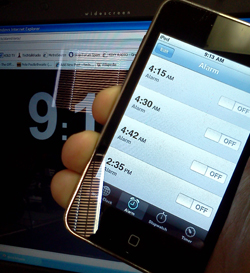
Over the New Years Weekend, users of the iPhone “complained” of the devices not waking them or reminding them of events due to a bug in the Alarm Clock function of the device. I’m actually owner of an iPod Touch and found the same issues others had faced. Luckily after working Morning Radio for the past 20 years, you learn to rely very little on just one device, this is one of those cases a wind up clock or watch alarm can provide some of the best backup for those that need the alarm clock to wake up at a set time.

Apple has indicated that users can reset their devices alarms and they should be now working after the two day “blip” What is interesting now is how the Android users are so quick to pounce on the iOS users. It is almost though as if Apple users are catching a little of what has been dished out over the years from Mac at PC Users when issues cropped up with the PC.  T-Mobile has already started to poke fun at those often humorous Apple Ads, we’ll have to see if Google adopts the same ad campaign for its Android OS. 

Maybe the idea to tether to technology for even the most simple of functions still appeals to you. There are backups for getting the reminders you need. Sure, you could hire an out of work engineer to follow you around and remind you of events and appointments but that might be stretching it and could get rather expensive. Even though I would like to say, hey – how about a wind up clock – I know I would be failing in my desire to have you the reader or viewer at the top of your game in the tech world.

There are several websites that offer up Alarms, but remember – many of these are dependant on an Internet Connection which can fail – one of my favorites is http://www.alarmd.comYou can’t get more easy or basic then this and I have gone to bed with an hours sleep to have the Train Crossing Alarm to get me out of bed. If you don’t want to depend on an internet connections, you could check out some software for doing the same function http://www.aquariussoft.com/pc-alarm-clock/ Is one such program which can be purchased for under 30 bucks.

If you are running Windows 7 you can also Activate the gadgets feature and run the Alarm Clock with Windows but honestly, spending a few bucks on a Wind Up might be the best solution if you don’t want to come up with a Tech Excuse for bieng late for work!

For those running the Apple iOS in Version 4 can reset previous reminders and alarms and acording to apple should be working ok now.

Exercise. That 4 Letter Word!

Yes, I said it. Exercise. I know, I know. It’s a nasty word! Before anyone jumps to conclusions or gets upset I wanted to let you all in on a little secret. With new technologies like Wii, PSMove, and Xbox Kinect, we now have the option of getting an extremely beneficial workout at the same time as playing video games.

Working Up a Sweat

Back in the early days of the PlayStation2 I actually lost about 35 lbs using the Dance Pad with Dance Dance Revolution and got a pretty nifty little benefit of cardio endurance during my marathon trainings. Most of the time I didn’t even realize I was working out because it was so much fun dancing to the beats and trying to remember the combos to score extra points.

Then, came the Wii with motion controls. When I had a FirstGen Wii, I loved playing games like Wii Sports and Wii Dance. I never did get a chance to experience the Wii Fit but I heard it is pretty fun. There are many more options to choose from now. EA Sports just released Zumba Fitness and some other really awesome games like Football Trainer and likewise there are many versions of Just Dance as well. Unfortunately, I had to “donate” my Wii to someone else, but was lucky to have kept my Ps3, a feat I am proud of to this day.

This brings me to the purpose of this blog. I recently had been released from the doctor to work out again and wanted to do something different than I had done before. It’s boring going to the TV and popping in a DVD or watching Fit TV to get a boring exercise routine out of the way just to say I did it. Blechhh!

Like many, I don’t like using my gym at the clubhouse here either because people are gross and leave many things unclean. I also don’t have confidence enough to walk in to a local gym with Barbie and Ken doing their 5 mile hill climbs and 30 mile recumbent bike rides when I am walking briskly for 1 mile and feel like, “I am going to DIE!”

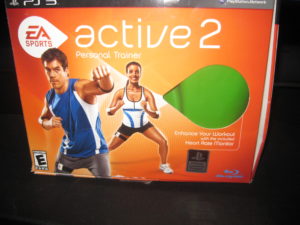
I found a solution. It’s completely awesome and so much fun. The game is called EA Sports Active 2. It’s a second version, similar to the EA Sports Active that was previously only released on the Wii a few years ago.  This newer version however is available for all 3 platforms and uses Kinect for Xbox360. The cost is about $99.99 but I’ve seen it around the web for as low as $69.99.  Pretty cheap considering the average gym membership is about $50.00 or more plus a personal trainer is going to cost you extra.

EA Sports Active 2 Personal Trainer Box

This game lets you personalize an avatar. Mine happens to be a bit curvy and has some junk in the trunk. Exactly my type of avatar! I don’t want to work out as Kim Kardashian if I don’t look like her. Maybe one day! Ha!

After you personalize your avatar, you create personal goals, and make a workout calendar for yourself. I began working out 4 days a week with 3 rest days as recommended by the game. I also chose the 9 week workout plan. It starts you off at a beginner level and then presses you through workouts at 3 interval phases throughout the program. You get to choose your own personal trainer. Mine is a motivating dude who lets me know when I’m doing a strength training move incorrectly by saying politely, “Stay still and make it count!” To which I usually reply, “Shut Up I hate you. No More Reverse Crunches!” Only because the game really makes you work hard but really it is truly fun. It’s definitely challenging for sure.

3 Phases of Fitness with Active 2

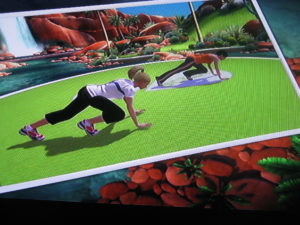
EA Sports Active 2 mixes cardio, boxing, kickboxing, step aerobics and strength training exercises all together.  There are really entertaining  exercises like Soccer Block, Bike Riding, Rail Sliding, and Basketball Shooting. We had a friend over on Thanksgiving when I got the game and he is an ex personal trainer at a well known gym. He did the exercises to try the game out for us for about 30 minutes and he was sweating. He said, “This game is way better than any of the other games I have played. It’s more real and makes you move.”

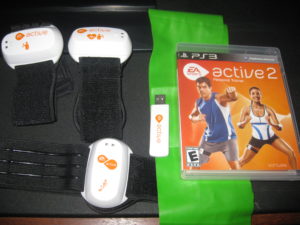
How does it track your movements? With the game comes three censors and a USB drive. There are two arm bands and one leg band. One of the arm bands has a censor on it to track your pulse and the other two are for motion censing. Now the first time I played, it was a bit awkward and the leg band kept slipping off my leg but I think because I didn’t have it tight enough was the problem. It also comes with a resistance band to help with the strength exercises like curl arm presses and reverse flys. It works pretty great at toning. I am already showing a bit of tone in my arms especially and my legs too from all the squats they have. The USB stick keeps track of your progress so that if you want to switch consoles or take it to a friend’s house to work out together you can travel and keep your progress on your stick. It’s pretty rad.

EA Sports Active 2 Equipment for Ps3

Your progress is kept daily. The games contains fitness goals, nutrition logs, tracks calories burned, fitness levels attained, weight loss and heart rates achieved. It’s rather thorough I’d say. You can also create custom workout groups to workout with friends and watch each other’s progress. Unfortunately, you cannot use cross platform groups. A friend of mine purchased Wii version of the game and created a group and I tried to join on my Ps3 version and we could not. However, we did make an online group on the EA Sports Active 2 website and were able to track each other’s progress that way.  I like to track my progress on facebook using the Ps3 feature of posting my achievements on my facebook profile page via Ps3. It’s motivating for me.

As far as the game goes, if you are looking to workout but you hate gyms or monotonous workout videos, give EA Sports Active 2 a try. Similarly, if you have a Wii, try out the Football Trainer that just came out this month. I would be interested in hearing if anyone gets it going and how they like it. It’s really a blast and the health benefits are already showing for me after only 4 weeks of training. Run out and grab your copy!  Happy Fitness New Year!

Sprinting

Adding a Hard Drive – “If All The Parameters Are In Place”

Adding a new Hard drive to the system should be easy and if all the parameters are in place, it will be. That’s the important thought however, “If all the parameters are in place…”

We received a Western Digital Caviar Green 3TB Internal Drive in to test out in the Media Center PC we are putting together and after putting the Motherboard and Processor in place, installing Memory, the Main Hard Drive (Western Digital 500GB 7200RPM 16MB Cache), Video Card and Windows 7 X64 (We’ll be testing with X32 as well) we were excited to add the WD Caviar Green 3TB Internal to the fold. After putting the rails on the drive and cables we booted the system up which located the drive. We selected the Create New Volume and after deciding to label the drive and choosing it as Drive M (For Media) we proceeded to Quick Format the Device. After about 30seconds the Quick Format failed and we then unchecked the box for Quick Format and decided it was possibly best to perform a detail and exact format. We knew this means it will take longer, but we were not expecting what happened next.

We started the format at 9:15am on Sunday 12/19/2010 and on Monday 12/20/2010 at 8:15am we were at 1%. Looking at the Storage Manager we could see that Windows 7 and the Intel Board could locate and visually see the drive however this was by no means normal. Without becoming all Sheldon on ya, this could in fact take 2 months, 23 days, 7 hours and 11.5 Minutes, give or take a month to format. Western Digital had sent a HPA Adaptor card which is a part of the 3TB Internal Drives, also the 2.5TB drives ship with this little card which plugs into the available PCI Express Port. We didn’t install the card since the Intel Board, the DH57DD was so new we assumed it should have no problem with the capacity of the drive.

If you aren’t aware, There are limitations in size for some boards accessing over 2.19TB. This little card that WD includes will help some boards be able to address the drive and welcome it to the hardware fold. WD even includes the plug in card with low riser and full size bracket for the smaller towers and regular sizes available. We plugged the card in, hooked up the drive and upon boot, the card was identified but the drive wasn’t. We let it boot and sure enough, nada was in the available drives. We shut it down, made sure the SATA Cable and power cable were connected firmly and rebooted. This time, the drive was seen and we proceeded to boot into Windows and begin the steps to reformat.

Once we deleted the previous volume and then reattempted in Quick Format Mode, it failed. We reattempted by deselecting the Quick Format and could see right away, the format was going to be a long process. Something just wasn’t right. We revisited the Western Digital website which features a very good video on adding a secondary drive with the WD Caviar Green 3TB and saw that all the steps we’d performed we’re inline. After a cup of coffee and racking the brain we decided to try one other step we hadn’t done, changing out the SATA Cable. We had provided this cable as the ones that came with the board were both used up.

Over the years you tend to amass a large quantity of cables and power cords, I always wonder if somewhere I forgot to hook up a cable because why do I have an extra!?
I located a SATA cable and connected it, rebooted the system went through the steps of deleting the old volume, recreating and performing a Quick Format. Viola! (Walla! for those not immersed in French..) Our Drive formatted and quickly. So, before you go calling Tech Support or heading back to Frys or Best Buy check the SATA cable to make sure that it isn’t the culprit. Also remember to toss the other cable since leaving it around will just cause you to put it in another system. Hopefully this helps somebody!!

Andy