Episode 465 – Pricey RAM and Scams That Sleigh Your Wallet

We have been running behind so wanted to make sure we share these episodes that Aired but have not been posted. Hope you enjoy them!


This week on TechtalkRadio, Andy Taylor and Shawn DeWeerd kick things off in full holiday mode with a look at Microsoft’s latest seasonal merch drop—highlighting the surprisingly steep price tag on the new “ugly sweater,” the retro logos packed into the design (and a few questionable modern additions), plus the equally head-scratching 50th anniversary Crocs and other oddball collectibles on Microsoft’s revamped merchandise site. The conversation rolls naturally into Shawn’s Christmas wish list—everything from retro gaming gear and board-game storage to soldering tools, ham radio accessories, and FPV drones—along with the realities of finding certain tech items in stock (or even available) right now.

From there, the show pivots to timely safety and consumer tech advice. Andy shares warnings tied to “Dangerous December,” reinforcing how critical it is to keep browsers and mobile devices updated during peak online shopping season, when older devices and outdated software can become easy targets. The duo also addresses a growing concern around romance scams, outlining common red flags—like refusing video calls or pushing for money—and reminding listeners how easily scammers can use public online details to build trust and manipulate victims.

We get a chance to answer a listener question from Cecilia in Tucson about a dropped laptop with a shattered screen—explaining how adding an external monitor can often bring the machine back to life, and walking through common steps to enable an external display if it doesn’t switch automatically. That discussion expands into practical habits for everyday computing, including whether to shut down systems overnight, what “update and shut down” really means in the real world, and how different devices (home rigs, servers, and work machines) have very different expectations for uptime and maintenance.

Later, Andy welcomes Linda Chorney—Grammy-nominated artist, filmmaker, and self-described DIY “rebel”—to talk about her new audiobook, It Ain’t Over Till the Indie Sings. Linda shares the remarkable story behind her career, how technology and persistence helped her navigate the industry, and how she taught herself production workflows—from editing and syncing audio to recording in Pro Tools and meeting modern audiobook standards. The episode closes with gaming news for Tomb Raider fans and a nostalgic holiday wrap-up, as Shawn recounts a weekend of in-person gaming, board games, and Lord of the Rings marathons—celebrating the kind of face-to-face tech friendship and shared experiences that many of us miss in today’s always-online world.

Episode 458 – “The Cloud Crashed: When the Net Goes Dark.”

Subscribe

For this week on TechtalkRadio, Andy Taylor and Shawn DeWeerd tackle the story that shook the web — the massive AWS outage that left millions wondering if their internet had vanished. The pair break down what really happened when Amazon’s U.S. East-1 region went down and how a simple DNS failure can ripple through nearly every service we use. From Coinbase and Reddit to Roku, Robinhood, and even smart-home devices, the hosts explain how so much of our digital life runs through the same narrow pipes — and why that can be a dangerous single point of failure.

With streaming services sputtering and smart devices silent, Andy and Shawn turn their attention to the unexpected hero of the week: physical media. They discuss why DVDs and Blu-rays are making a quiet comeback and share the tools that make it easy to preserve your collection — from MakeMKV for ripping discs to HandBrake for compressing files and Plex for organizing your own personal streaming library. It’s a reminder that having your favorite shows and movies on hand (and not in the cloud) can be both nostalgic and smart in 2025.

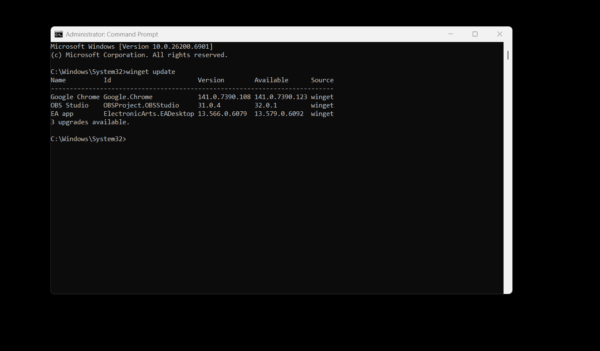
The episode also dives into practical Windows tips, including Microsoft’s WinGet — a built-in command-line updater that keeps your apps current with a single command. Shawn tests it live on air and finds nearly half of his software out of date. Andy also fields listener questions about Windows 11 S Mode, breaking down who it’s for, why most users eventually turn it off, and how Microsoft’s locked-down environment compares to the open flexibility we’re used to.

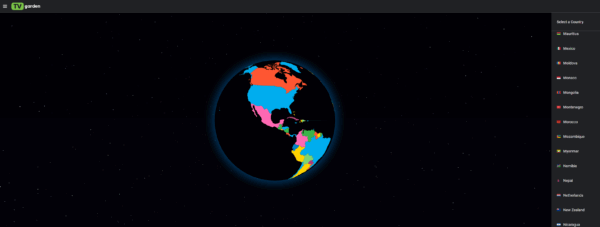
Finally, the hosts spotlight two incredible websites that make technology feel fun again. TV.garden lets you spin a virtual globe and watch free, live television from countries all around the world — a discovery that had Shawn geeking out over obscure motorsport streams. And Explore.org offers a front-row seat to nature through hundreds of live animal cams, from Alaska’s famous Fat Bears to serene ocean sanctuaries. Whether the cloud is crashing or calm, Andy and Shawn remind us that tech should connect, entertain, and inspire — even when the net goes dark.

Episode 454 – “Apple’s New iOS, AI Shenanigans, and Roku Lights Up the Room!”

This week on TechtalkRadio, Andy Taylor and Shawn DeWeerd unpack iOS 26 after Apple’s recent wave of updates. Shawn—who’s been living on the beta—explains why the OS now feels “built for two-handed use,” with core actions and search shifting to the bottom of the screen. For anyone returning from Android or upgrading older iPhones, it’s less about flashy features and more about retraining muscle memory: new-message buttons, close icons, and search live where your thumbs naturally are.

From there, the conversation widens to the state of AI. Andy contrasts the speed and usefulness of Google’s Gemini for quick studio lookups with Siri’s slower responses, while both hosts wrestle with where AI is genuinely helpful versus where it still feels off. Practical wins include Lightroom’s AI noise reduction, using AI to wrangle manuals and code snippets, and Google’s NotebookLM—now with interactive “ask-as-you-listen” study sessions. On the flip side: AI-generated images still struggle with fine details and text, and accuracy gaps make “AI slop” risky for mission-critical work.

In smart home talk, Shawn revisits Wyze’s value gear—cameras, bulbs, and a new palm-vein recognition lock—plus the subscription math behind Cam Plus. He argues for a simple but powerful upgrade: first-class RTSP so users can record to their own NAS and keep footage off the cloud by default. Listener Q&A rolls through texting mysteries (blue vs. green bubbles and how RCS now bridges some features with Android), and the looming Windows 10 end-of-support date. They weigh Extended Security Updates versus buying new machines, and when Rufus can help install Windows 11 on borderline hardware—while warning that not every system will make the cut.

To cap it off, the guys look at Roku’s first projector (1080p with Roku OS, auto-focus/keystone, Bluetooth private listening), share a handy tip for listening through headphones via the Roku app, and flag a recent Plex security incident—change your password and be cautious with the latest Roku Plex app update if you’re seeing stutters or crashes.

Got a question for the show? Email techguys@techtalkradio.com, and catch more at techtalkradio.com.

Please Share, Listen, Subscribe to the Show on Spotify, Spreaker, iHeartRadio, YouTube and Our YouTube Page.

Connect With Us on social media
YouTube @TechtalkRadio
Facebook @techtalkers
Instagram techtalkradio
Web: TechtalkRadio.Com

Also Available on KGVY AM/FM, Amazon Music, PodBean and other Delivery Networks!

Disclaimer: If you click an affiliate link and buy a product or service, we may be paid a fee by that merchant.

NEW EPISODE #452 – K-Pop, YouTubeTV Battles & Windows 95 Turns 30!

Subscribe

This week on TechtalkRadio, Andy Taylor, Matt Jones, and Justin Lemme take listeners on a ride through pop culture, tech nostalgia, and the latest gadgets. We kick things off with Netflix’s surprise mega-hit K-Pop Demon Hunters, which has quickly become one of the most streamed films on the platform. Matt shares what this all has to do with Hannah Montana! The guys explore how the movie’s catchy soundtrack, unique animation style which Justin is not a fan of, and unexpected success are reshaping both the music and movie industries, But is it Enough?

From there, the conversation shifts to the future of movie theaters. Justin shares a hilarious yet frustrating story about his AMC theater experience, his impression is spot on, while Matt explains why premium theaters like Alamo Drafthouse are thriving. Andy shares a similar venue in the Tucson Area called Roadhouse Cinemas. The team debates whether streaming at home with services like YouTube TV is now a better option than overpriced tickets, flat sodas, and broken popcorn machines. Listener Steve from Tucson also sparks a great discussion on whether cutting the cord for YouTube TV is worth it.

On the tech front, Matt shares a new development with his new AI-powered home lab, now complete with Reolink 4K cameras and custom video analytics that can detect pets, license plates, and even track the dogs around the house. Justin, meanwhile, shares his return to the ambitious (and still in alpha) Star Citizen, a space sim that continues to evolve.

Of course, no trip down memory lane would be complete without celebrating 30 years of Windows 95. Andy, the Old Guy in the Room, realizes the Age Gap, when he ask Matt about the excitement of installing Windows95! The guys do reminisce about floppy disks, DOS gaming, and the long list of Windows versions that shaped the modern PC era. They also explain the term doom-scrolling for listeners who might be hearing it for the first time.

Finally, Matt ditches his smartphone and previews the brand-new Google Pixel 10 XL, fresh from Google’s “Made by Google” event. He’s already pre-ordered the device and will share a hands-on review in next week’s episode.Why didn’t Matt like the one he had before?

Please Share, Listen, Subscribe to the Show on Apple, Spotify, Spreaker, iHeartRadio and Our YouTube Page.

Connect With Us on social media
YouTube @TechtalkRadio
Facebook @techtalkers
Instagram techtalkradio
Web: TechtalkRadio.Com

DON’T MISS A BEAT

Be the first to know when our Shows and Video Content is released

We don’t spam! Read our [link]privacy policy[/link] for more info.

A Look at the Asus ROG Flow Z13 – News13 Segment

It is Always fun to share the Latest Cutting edge Technology and for this Mornings Segment, We give you a first hand look at a product released less then two weeks ago that has been created with the Gamer and Heavy Computer User in Mind.

The product is not a Desktop PC, Not a Laptop but a combination Tablet and High End Gaming Notebook, The Asus ROG Flow Z13. This Powerhouse of a Tablet/Notebook features an AMD Ryzen Max Ai Processor 390 or 395 Processor and can be configured at 32GB of Memory and can also be purchased with 128GB! 1TB of M2 for your Storage and Radeon 8060S Integrated Graphics. This Can help the user play even the latest video game titles without worrying about Lag, again all of it on a 2 in 1.

The Graphics look sharp and flow great on a 2.5k ROG Nebula 13.4 inch Touch Screen and feature a bevy of Connection options such as dual USB-C ports, both of which support USB4, DisplayPort™ 1.4 output and sports a dedicated HDMI 2.1 port, a USB Type-A port, a microSD card reader, and an audio combo jack. We also love the Aura RGB Effects for the lighting of the Keys and back of the screen which shows the inner componants.

The 2 in 1 has one of the sturdiest feels I have had in a Mobile device protected by Corning Gorilla Glass 5 protection and its design for Cooling and Airflow helps with speed as well as the power features in most cases delivering up to 10 hours of use under a charge. It weighs about 3.5 pounds with the foldable/removable keyboard.

Depending on the Configuration Pricing Starts at about 1999 and can go to about 2799. More info at https://www.asus.com/us/