KMSB Video Segment : The Apple MacBook Neo and the EZQuest Hub That Expands Its Capabilities

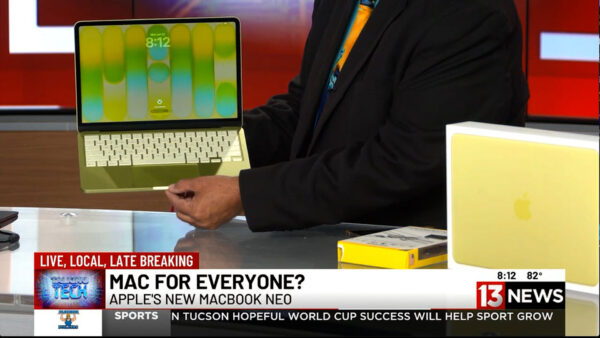
For years, Apple laptops have been known for premium performance—and premium prices. But during this week’s Talking Tech segment on KMSB Fox 11, Andy Taylor showcased a new option designed to make the Mac experience more affordable: the MacBook Neo.


Starting at just $699, the MacBook Neo is aimed at students, families, first-time Mac users, and anyone considering making the switch from Windows. Featuring a bright 13-inch Retina display, lightweight design, up to 16 hours of battery life, and Apple’s efficient A18 processor, the Neo delivers plenty of performance for everyday computing tasks including web browsing, email, office work, social media, streaming, and light content creation.
Andy also highlighted one of Apple’s biggest strengths—its seamless integration with the iPhone. Users can access Messages, share files effortlessly, and enjoy the growing capabilities of Apple Intelligence and Siri, creating a connected ecosystem that works together right out of the box.

While the MacBook Neo includes two USB-C ports, modern laptops often require adapters for legacy accessories and additional peripherals. That’s where the EZQuest USB-C Hub comes in. The compact hub dramatically expands the laptop’s connectivity, allowing users to connect USB devices, external storage, monitors, SD cards, wired networking, and even external optical drives through a single connection. It’s an ideal companion for students, professionals, photographers, and anyone who regularly works with multiple devices. The Below Video is our Segment from The TechtalkRadio Show featuring the MacBook Neo – Pricing did increase after Airtime but this gives you an overview of the Neo and EZQuest Hubs.

Andy noted that while power users editing large video projects may still prefer stepping up to a MacBook Air or MacBook Pro, the MacBook Neo offers an impressive balance of portability, battery life, and affordability. Combined with the versatility of the EZQuest hub, it becomes a capable everyday workstation that can grow with your needs.

Whether you’re returning to the Mac platform, buying your first Apple computer, or simply looking for a reliable laptop without spending well over a thousand dollars, the MacBook Neo proves that Apple computing is becoming more accessible than ever. Check out the Full Show at TechtalkRadio.com


Episode 453: Apple’s Big Reveal – Awe Yeah or Yeah No?”

Andy and Shawn kick off this weeks TechtalkRadio with The Big Apple September hardware drop called The Awe Dropping Event, Shawn shares his excitement over the announcements which included, new AirPods Pro 3 (better ANC, on-bud heart-rate monitoring, and live translation via “Apple Intelligence”), three Apple Watch tiers (SE as the budget health watch, Series 11 adding hypertension and deeper sleep tracking, and Ultra 3 with satellite messaging and up to 72-hour battery), plus the iPhone 17 family. Highlights include a super-thin iPhone Air (~5.3mm, ceramic-coated glass, 120Hz), across-the-line 48MP cameras, Pro/Pro Max video chops (4K/120, ProRes RAW, timecode/Genlock via accessory), bigger batteries (Apple touts ~27–32 hrs video playback), a rechargeable MagSafe pack, and indicative pricing mentioned on-air ($799 base 256GB iPhone 17; Air ~$999; Pro ~$1,099; AirPods $249; watches “about the same” as current gen). The crew debates whether any of it is a must-upgrade and notes Apple’s limited AI story beyond translation.

Justin, not a fan of the Apple Products jumps in to compare live-translate (Pixel’s had versions for years), rave about Pixel zoom demos, and spotlight Denver’s newly announced high-tech retractable-roof stadium plan. The guys also cover the viral “Baseball Karen” meme saga (“the internet never loses”) and drop a nostalgia gem as Website of the Week: BigBoxCollection.com—gorgeous 3D scans of classic big-box PC games.

Listener Q&A:
• “McAfee” pop-ups without McAfee installed = likely malware or a rogue browser extension. Solution: review/remove extensions, run Malwarebytes (ideally from a clean USB), and avoid calling scam numbers.

• Ripping CDs at home: Windows Media Player or VLC still do it; then back up to cloud + an external drive (practice the 3-2-1 rule).

Production note: Andy shares why the show moved to Riverside FM—clean local tracks, transcripts/teleprompter, smart editing—and a jaw-dropper: AI profanity replacement that sounds like the host. Justin closes by unboxing plans for a new enclosed, auto-leveling 3D printer and what he’ll make first.

New Show – The Pixel 9 Can Do All That?

In this week’s TechtalkRadio Show, Andy Taylor, Shawn DeWeerd, and Justin Lemme caught up after a busy couple of weeks. Justin shared his recent experience of tearing his calf muscle while walking at Waterworld, while Shawn talked about hosting Notre Dame’s first home football game of the season, which unfortunately ended in a loss. Sitting out the show, Justin received his Pixel 9 Fold smartphone and provided an overall review, highlighting its AI capabilities through the Gemini platform. One feature lets users reimagine photos and map search results, and Justin also showcased the phone’s ability to recognize and respond to hand gestures. The team discussed the phone’s price, with Justin mentioning a significant discount he received through his Google Fi and Google One memberships. He also shared his excitement about the new Pixel Watch 3, which he had recently acquired.

During the discussion of AI in the Pixel 9, the guys noted Apple’s recent announcement at the “It’s Glowtime” event, which introduced Apple Intelligence for the upcoming iPhone 16. They compared the performance of different AI assistants, with Andy expressing disappointment in Siri’s results. Shawn suggested that Apple’s AI focuses narrowly on tasks within the Apple ecosystem, while Justin and Andy recounted their experiences with Google’s AI. Andy shared a frustrating story involving Waze’s directions, and the group agreed that Apple’s AI is still playing catch-up with other manufacturers.

Justin highlighted the Pixel 9’s unique ability to automatically stitch photos together for seamless family shots. The conversation also touched on how easy it is to transfer data between Android devices, with Justin praising the smooth process.

Shawn brought up the recent announcement from DJI about their new lightweight drone, the DJI Neo, priced at $199. Designed for beginners, vloggers, and casual users, it features a 12-megapixel half-inch sensor, 18 minutes of flight time, and a control range of up to 50 meters via Wi-Fi. Justin raised concerns about its limited control range, noting it might not be ideal for high-altitude or long-distance flights. Shawn also mentioned the recent passage of the Countering USA Threats Act by the House, aimed at restricting drones from foreign countries, particularly China, which could impact companies like DJI. The bill now heads to the Senate.

In response to a listener question from Gary, the team discussed antivirus options for personal use. Justin recommended Windows Defender, while Andy shared his experience with Symantec. They also considered alternatives like Malwarebytes and ESET, with Shawn mentioning a family protection plan he has with Malwarebytes. The team agreed that choosing the right antivirus depends on individual needs and preferences. See Below the Photo’s “Imagined” with the Gemini AI on the Pixel 9 of Justin’s CoWorker

Also featured was a discussion of former guest and writer Ed Bott’s article at ZNet about upgrading from Windows 10 to Windows 11 and ways to “Get Er Done!” Finally, the Website of the Week was the app “Spot the Station,” which alerts users when the International Space Station is flying over their community.

Credit ; NASA - The Spot the Station App